Quick Pulse Study:
Early Investment Actions in the Visual Studio Installer
Project Details
Company name
Microsoft, Developer Division
Date
July 2021
Problem
There is much wait time required when a user goes to install Visual Studio. Are there productive actions a user could front-load into this period of waiting to save time later, once the product is installed?
Hypothesis
We believe if a Visual Studio user makes an investment action in early setup (such as selecting their IDE theme), they are more likely to complete a full installation—increasing Visual Studio retention* rates and widening the acquisition funnel**.
*Retention: A user is considered “retained” if they successfully install Visual Studio and use the IDE for development.
**Acquisition funnel: Visual Studio’s acquisition funnel is a measure of retained users. The funnel begins with a large number of users who can be deterred by slow performance, non-intuitive user experience, frustrating setup, etc. Thus, a quick setup to VS usage is important.
The importance of Customer TYpe
There are many types of customers using Visual Studio: students, professors, hobbyists, trained professionals, and experienced developers. For the purposes of this study, we recruited three experienced developers.
Testing Methods
Background Questions asked to Customers
-
This question helps gauge how frequent our problem and hypothesis take place.
-
This question helps us understand how users spend the period of time while waiting for Visual Studio to install.
Mock-Ups
Users could progress through the VS installation process via PowerPoint slides and verbal communication on where they would click to advance. The theme picker mock-up is displayed in the installing VS instance’s product card*. Customers could choose whether to engage with this feature.
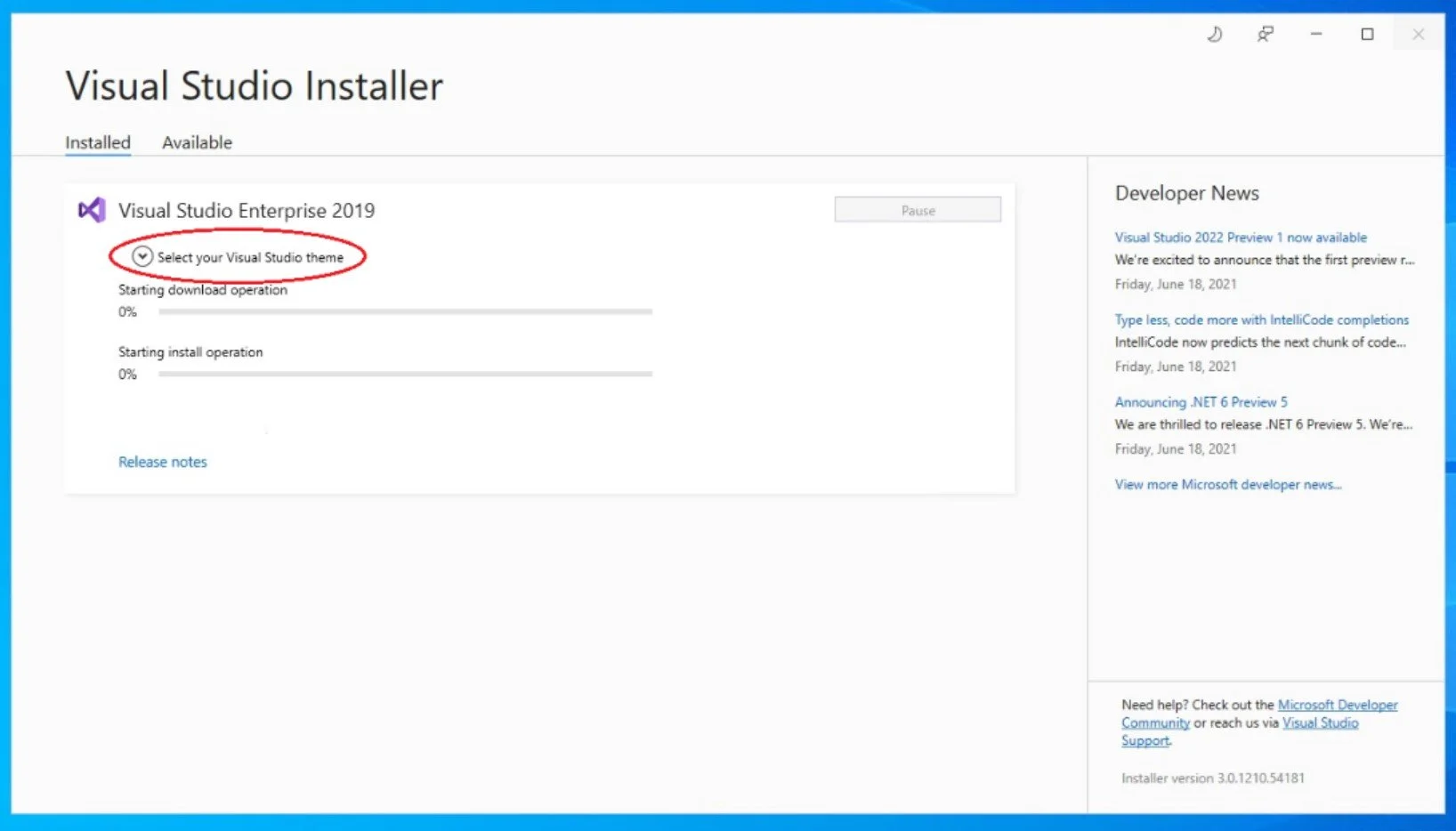
This mock-up was shown to customers, with the “select your Visual Studio theme” dropdown as an additional component.
*Product card: The part of the Installer UI containing details specific to a VS instance. Includes VS version name, progress bars, release notes, and in this experiment, a theme picker.
Follow up Questions asked to Customers,
After seeing the prototype
-
This question gauges theme picker interest specifically (other front-loaded actions for future studies include credential management and/or Github sign-in).
-
This question helps gauge whether the customer cares about saving time during the VS installation period.
-
Here, we are trying to see if the customer has other ideas for tasks they would like to accomplish early on when using Visual Studio.
-
If a simple “yes” or “no” is answered, the UX researcher’s favorite follow-up question is ”why?”
Results
Key Takeaways
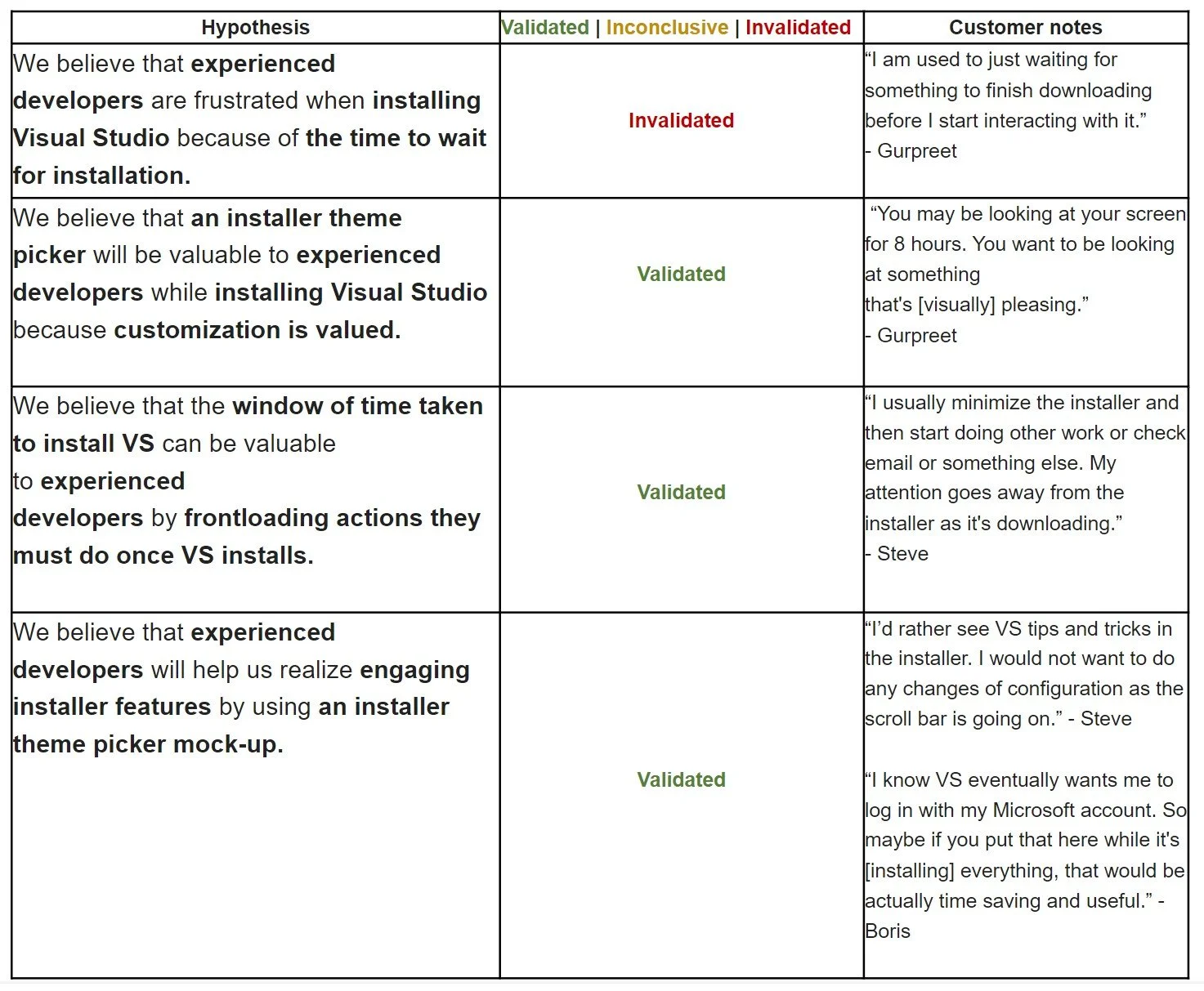
Experienced developers have preconceived notions of the installation experience making them used to wait time and prone to minimizing the installer window.
Experienced developers value a secure, full download before engaging in too much IDE personalization.
“I would want everything installed before I start changing features. I'm uneasy about any changes as the [progress] bar is going on.” - Steve
The idea of VS tips and tricks and/or a credential manager to engage with during the window of install time is valued over IDE configuration changes.
Future Early Investment Experiments
Retention | Target Users: New VS Users (CS Students)
With no preconceived notions of the VS installer, new VS users may find early investment actions to be time saving and beneficial to their workflow.
Accessibility | Target Users: Visually impaired
Visually impaired users tend to choose Visual Studio’s high-contrast theme which currently requires an IDE restart to apply. By making a high-contrast theme selection in VS installation, there is no need to restart the IDE since the preset will already be applied upon first VS launch. This could prove to save user time and provide accessibility benefits.